A Better Lock Screen for Your Mac
Turn the Mac lock screen into a focused music experience with artwork, playback controls, and track progress.
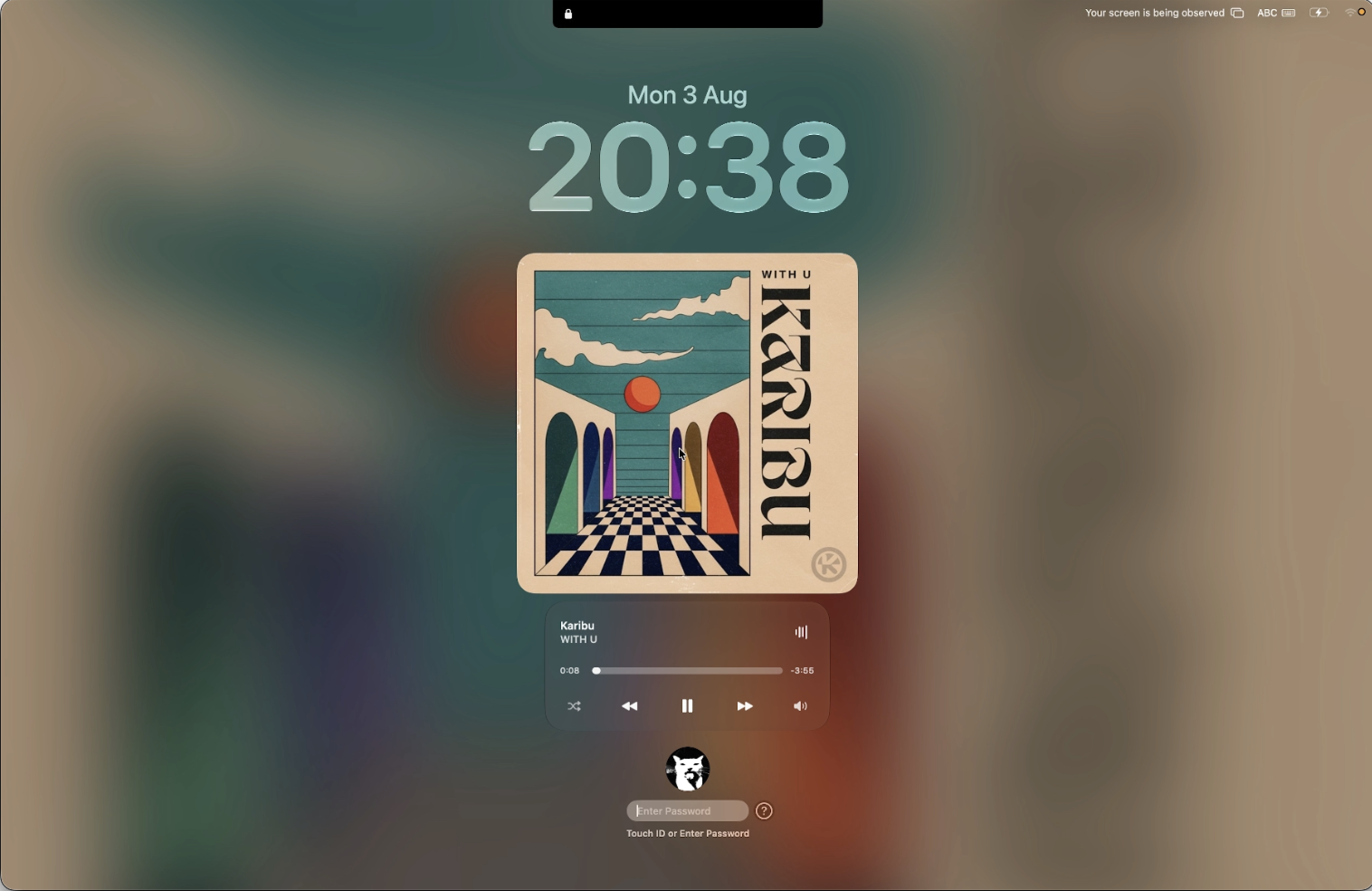
Your Mac deserves a better lock screen. Notchly turns it into a calm, useful music surface with the current track, large album artwork, progress, and playback controls placed where they are easy to see.
Music at a glance
The active track gets room to breathe. Artwork becomes the visual focus while the title, artist, and playback state stay readable without opening another app.
- Large album artwork centered on the lock screen.
- Track title, artist, elapsed time, and remaining time.
- A softly blurred background that complements the current artwork.
Playback without unlocking
Essential controls remain close at hand, so you can manage music before returning to your desktop.
- Previous, play or pause, and next controls.
- Track progress and quick seeking.
- Shuffle and volume controls when supported by the active music source.
Designed to feel native
The player stays compact and centered, works with the shape of the MacBook display, and keeps the rest of the lock screen quiet. It feels like part of macOS rather than another window placed on top.
See it in action
The original preview shows the complete lock screen composition and how Notchly fits into it.